What’s New in TruMonitor v5.0: Advanced ECG, Smarter Instructor Tools, Lifepak 35 & More
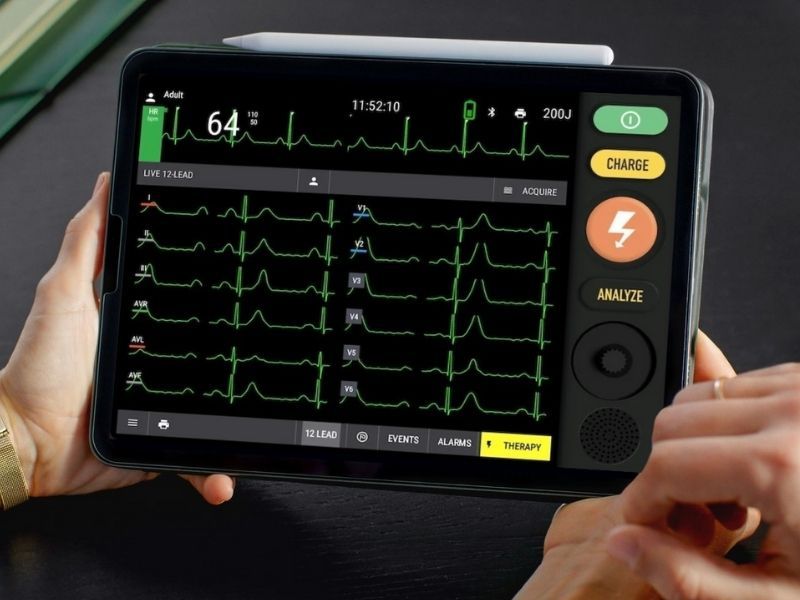
New: Advanced 12-Lead ECG Support
We’ve introduced full 12-lead ECG support on compatible TruMonitor skins — making cardiac simulation more realistic and powerful than ever.
What’s new:
✅ 12-Lead Mode is now available for all ECG patterns on supported skins
✅ Lead selection: View any lead on demand
✅ Instructor preview: Quickly inspect 12-leads from the control panel
✅ Smarter ECG picker: Search, filter by category, and find the exact rhythm you need — faster
New ECG patterns added:
High Grade Heart Block (4:1)
Moderate Hyperkalemia
Left/Right Bundle Branch Block
Bifascicular / Trifascicular Block
Inferior, Anterior & Lateral MI
Agonal Rhythm
This update unlocks a more complete training experience for anyone teaching or learning advanced ECG interpretation.
Advanced 12-Lead is available on ‘Generic 2025’ - and all skins under the ‘recently updated’ section
🎛️ New Instructor Tools for Real-Time Control
TruMonitor just got even smarter for instructors — with new features that make hands-on training more immersive, responsive, and effective.
🚨 Live Control Features:
Manual Ventilation Mode
Simulate bag-mask ventilation in real time — press to ventilate, release to stop. ETCO₂ responds instantly.
Adenosine Simulation Mode
Pause SVT with a tap, then resume or convert to sinus rhythm — just like pushing adenosine in a real scenario.
Start NIBP from Instructor Panel
Trigger a blood pressure reading instantly if you need to assist a student.
🔗 Smarter Integrations:
Capnography & Respiratory Rate
Automatically syncs with QCPR manikins when Manual Ventilation Mode is enabled — no setup required.
Chest Compression Fraction (CCF)
Added to CPR feedback for a more complete performance overview.
🎚️ Customisation & Control:
Expanded Heart Rate Range
Now selectable as low as 10 bpm for bradycardic or peri-arrest cases.
New Timer Tool
Built-in stopwatch for scenario timing, rhythm checks, or anything else.
Volume Controls for CPR & AED Feedback
Fine-tune feedback volume for clearer instruction during noisy sessions.
🩻 New Secondary Display Skins
Now you can extend your simulation setup with dedicated screens — no extra licenses needed.
New skins are available to display:
Investigations (e.g. bloods, ECGs, imaging)
CPR Feedback (live data during compressions)
Just connect an additional tablet to the same session — TruMonitor handles the rest.
It’s a simple way to make your scenarios more immersive, organised, and visually powerful.
🔄 Faster, Frictionless Sessions
New auto-connect logic makes multi-device setup near-instant:
Auto Start
The instructor’s app automatically starts a local session on launch.
Auto Join
Student devices connect automatically to the first session they discover — no need to pick from a list.
Auto Resume
If the connection drops, it reconnects seamlessly when the app restarts.
🖥️ New & Updated Monitor Skins
We’ve added new skins and upgraded key favourites to enhance realism and flexibility:
Generic 2025 – A refreshed look with full 12-lead support, lead selection, and improved alarm settings.
Nihon Kohden EMS-1052 – Fully rebuilt and now available in Japanese.
Lifegain CU-HD1 – Includes AED, manual defib, and pacing modes.
Lifepak 35 – Now in early testing with core functionality live; more updates coming soon.
🐞 Bug Fixes
Fixed: Pacer dialog couldn’t be closed on Zoll X Series
Fixed: Urinalysis couldn’t be deleted from investigations
Fixed: Shock/Pacing now properly triggers Scenario Builder step
Fixed: SFX volume was not adjustable
Fixed: Compression depth issue for baby QCPR manikins
🔄 Update now via the app store — and let us know what you’d love to see next.